Style guide for Crossing the 50
- What is a style guide?
- Why do I need to use a style guide?
- How do I create an accessible site?
- How do I use metadata?
- Style Guide
What is a style guide?
Crossing the 50’s main goal is to provide an online resource for women looking to learn more about football. To ensure readers are given the highest quality product, a style guide will help to establish consistency with design and content principles. The style guide will also provide a guideline on how to maintain and grow the site for the future. The style guide also maintains the presentation and voice of the site for current and new readers.
When adding to the site’s content or changing the design, it is important to consult the style guide to ensure that the site maintains its theme throughout. The style guide helps to take the guesswork out of maintaining and growing the site by providing all the information needed to make changes. Therefore, the style guide will be used by any individual who is responsible for maintaining the site.
Why do I need to use a style guide?
There are many components to Crossing the 50’s website and a style guide provides organization for all the components involved in the design and content. Without a clear and concise guide, the information incorporated into the site could potentially not fit the audience and cause confusion and frustration for the reader. Using the style guide will eliminate these issues by providing a structure for incorporating and updating material on the site.
How do I create an accessible site?
Accessible sites are designed for people with disabilities. Accessible sites allow equal access to all users without complications. An accessible site not only helps readers navigate throughout the site but it also helps readers find the site. Having an accessible site also helps creates a Search Engine Optimized (SEO) site. Crossing the 50 can be accessed from the following browsers:
- Internet Explorer
- Firefox
- Chrome
- Safari
- Mobile browsers
There are several ways to make a website accessible. Below are ways in which this site makes it accessible to all users:
Title tag
Each web page should have a filled in ‹title› tag and should follow the format below:
Example: Title of page | Crossing the 50 | short keyword description
Tags containing links and images should utilize the title and alt attribute. The title should use keywords and include a short sentence naming the object. The title tag should describe the action in the picture.
- More like this: The offensive and defensive positions on the football field
- Not like this: The players on the field
Alt attribute
The alt attribute helps users with screen readers. The alt attribute should be a short description of the links and images.
- More like this: football player’s positions on field
- Not like this: football field
Style Guide
Template Layout
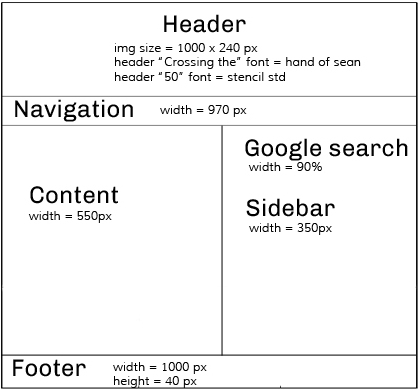
Crossing the 50 contains the following sections:
- Header
- Navigation
- Content area — where all the articles and their corresponding pictures live
- Sidebar — contains Google search, a NFL widget, and a ESPN widget
- Footer — quick links, latest football news, and upcoming football games
The template displayed above is the only template used for Crossing the 50. The only editable section is the content area. New pages are created by copying the default.html file. Then the following areas need to be changed:
- Save the file and use an underscore (_) to join two or more words
- Change the meta name keywords to match the page's content
- Change the title tag
- Link the CSS style sheets and the navigation bar
- Edit the content area with new content
If a new page is being added to the site, make sure to add the page in the proper section of the navigation.
1. Determine if the new page will fit under the current categories in the navigation: about, rules of the game, cheat sheet, players, or traditions
2. If the page fits under the current categories, follow the structure of the current subcategory and place the new page within the navigation
3. Make sure to add the new subcategories to the other pages in the site.
4. If the page does not fit under the current categories, the font will need to be reduce to accommodate the additional text. Start by reducing the font by two pixels. Text size should not go lower than 12 pixels.
CSS and HTML formatting
The site has two different CSS style sheets: template and text CSS. The template style sheet contains the coding for the header, container, footer, sidebar, navigation, and tables. You will find comments in the template style sheet indicating parts of the site the codes edit. The template style sheet should only be used to edit the components of the site.
The text style sheet contains coding that formats the h1 through h4 tags, bulleted list, body text, links, and other small formatting pieces. The components in this sheet can be changed to improve the look of the site. The text style sheet will be used more often then the template style sheet.
Crossing the 50 uses tags h2 through h4 for subheading. The h1 heading tag is reserved for the logo header image. The site also uses bulleted list but removes the bullets with CSS found in the text style sheet.
Heading tags should be used in a specific way to create consistency and order throughout the pages. Below you will find the use of each heading and an example of what they look on the site:
h2 heading
h2 headings are used for the title of the web page
h3 heading
h3 headings are used to create headings
h4 heading
h4 headings are used to create subheadings to h3 headings
Color palette and fonts
Crossing the 50 uses a mostly monochromatic color scheme with a small amount of a complementary color to add contrast when needed. Varying hues and saturations of pink are used throughout the site with its complement green for contrast. When pink is used as the background color as in the navigation and footer, the text will be white - #FFFFFF. Below are the specific hexadecimal colors and how they should be used throughout the site:
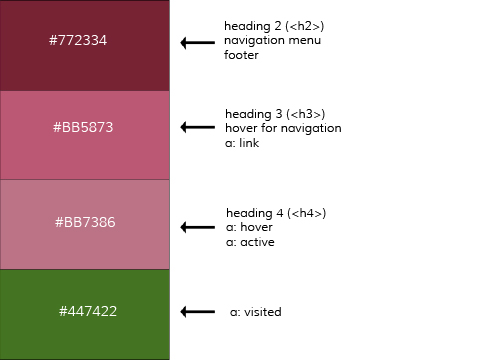
There are two main fonts used on the site. For headings, Chivo from Google fonts should be used. For the main content, Muli should be used. Two other fonts are used for the site's title - the header. For “Crossing the”, Hand of Sean should be used and for “50”, Stencil Std. If you have any questions about Google web fonts, please refer to Google’s Web Fonts FAQ. Below you will find a detailed use of each font in the website.
Typography
The content is the most important part of Crossing the 50. With that the layout of the text must be presented in an easily comprehensible way. The following information will address content format:
- Heading 2 has a bottom margin of 30px.
- Headings 3 and 4 have a bottom margin of 5px and top padding of 10px.
- All text in paragraph tags has a bottom padding of 15px.
- Images have a top, right, and left padding of 13px, a bottom padding of 25px.
- Bulleted list have an indent of 40px and a bottom padding of 15px
- Text follows a ragged right alignment with lines that measure 72 characters
Authoring guidelines
Content for Crossing the 50 should be written in a informal and conversational tone. The voice used for this site is similar to a woman talking to a friend about a subject she's unfamiliar with. The friendly tone is suppose to make the reader feel comfortable with the subject and open to ask questions about anything that is confusing. The goal of the site is to draw in the reader and keep her interested in the subject of football.
A friendly tone does not leave room for nonessential information. It can be easy to get off topic but for the sake of our readers it's important to stick to the topic and discuss only the information important to the subject.
Below you will find additional tips that should be used to help readers find the answers they need and bring them back to the site.
- Use headings to make content scannable
- Use images to help relay messages when words aren't enough
- Use the active voice
- Use simple language and short sentences
- Use words familiar to the reader
- Use “I” and “you” to create a relationship with the reader
This site follows the APA guidelines for formatting. Differences from the APA guidelines are found below.
For bulleted list, the site does not use punctuation at the end of each item. Each item should also start with a capital letter.
Images and Media
Images follow the same format as bulleted list. They should have a left indent on them of 30px. Each image requires an alt attribute and title to help readers and search engine. All images should be saved as a JPEG. The images used for the AFC and NFC logos are saved as PNG. Theses images are the only ones saved as PNG all others should be JPEG files.
Crossing the 50 does not have a defined size for images. Images should fit within the main div for the site. The largest width of the images should not go beyond 550px. The images should also not stretch longer than 550px.
Images are placed at the top of pages. In some cases the image, like the home page, is after text. This happens only on the home page.
When adding images to new pages, the image should help illustrate the topic you will be discussing. Additional images can be used if the page is text heavy.
Web policies
Crossing the 50 wants to create an inclusive environment and invites all readers to join the community of the site. Any part of the site that conflicts with this idea will be removed/edited to be more inclusive.
Contact and support information
Crossing the 50 is hosted at Bluehost. To gain access to Bluehost please contact style guide@crossingthe50.com for permission. If you have any questions or suggestions for the Crossing the 50 style guide feel free to contact us at the email address above.